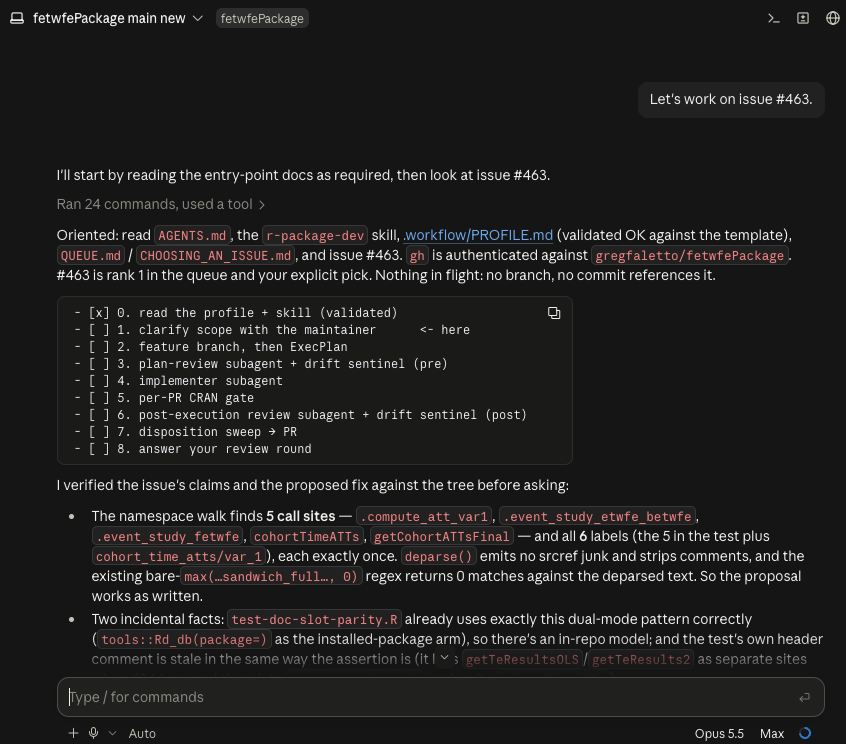
I’m excited to announce that r-package-dev, a skill for developing statistical and numerical R packages with a multi-agent workflow, is now available on my GitHub! The idea is that the input to the skill is a reasonably well-defined issue for an R package, and the output is a pull request (PR) solving the issue. This post covers what the skill does and how to use it.
The skill is meant for statistical packages that implement an estimator, a model, or an algorithm against a documented methodology. In that kind of package, incorrect implementations can be hard to detect since they may generate perfectly valid output. Much of the workflow exists to defend against these kinds of failures.
I built the skill while working on my own packages, {fetwfe} and {cssr}, and I’ve been using it for developing those packages for a while. I feel like it’s polished enough now to release it.
How the skill works
The skill is designed to work with an R package in a GitHub repo, with issues created that you want to work on.
The agent you talk to acts as an orchestrator of a multiagent system. For each issue, it starts by clarifying the scope with you, writing a plan, and spawning a subagent to review the plan. Then it implements the change, runs a set of checks every PR has to pass for the package to be CRAN-ready, gets the diff reviewed, and opens a PR.
Planning comes first. Once you’ve agreed on the scope, the agent writes an ExecPlan (adopted from the OpenAI Cookbook), a design document detailed enough that an agent with nothing but the plan and the code could deliver the change. As the work goes on, the agents record their progress, the surprises they runs into, each decision they make and why, and every question they ask you. Every plan is also held to a standard set of acceptance criteria. For example, each new test has to fail before the source change and pass after it, and a user-visible change needs a NEWS.md entry.
A plan reviewer subagent with a fresh perspective checks the plan before implementation. After implementation, another fresh post-execution reviewer subagent reviews the diff. Each reviewer writes its findings to a file, and the orchestrator answers every item in writing, responding to the reviewer and repeating the cycle. A review repeats until a round comes back with no blockers and no open suggestions for making the change simpler or more robust.
The drift sentinel is a third reviewer subagent. It runs once on the plan, after the plan review, and once on the diff, alongside the post-execution review. It looks for a narrower set of problems that the other reviewers aren’t set up to catch, like duplicated code or an edit that makes an existing test unable to fail.
Implementation often goes to a subagent too, if the change is large enough. The implementer commits to the feature branch as it works.
What a session looks like
If you’re in a repo for an R package and you have the skill installed, you can start the workflow with a prompt as simple as “Let’s work on issue #27.” The agent loads the skill, reads the profile and the issue and typically comes back with a handful of narrow questions. Once you’ve answered, it restates the scope in one paragraph and waits for your yes.
After that, it runs the rest of the cycle without asking you to approve each step. It comes back early only when it needs a decision from you, like a design question the plan didn’t anticipate. Here’s the rest of the cycle:
- Create a branch and write the ExecPlan.
- Review the plan with the plan reviewer, then with the drift sentinel’s first pass.
- Implement the change, handing it to an implementer subagent if it’s large.
- Run the CRAN gate: format (if you use a formatter), document, test,
devtools::check()set to fail on any NOTE, a spell check, and a URL check. - Review the diff with the post-execution reviewer, alongside the sentinel’s second pass.
- Sort out the deferred work, meaning everything the cycle set aside as out of scope. Each item gets exactly one disposition: filed as an issue, done now or in a named next PR, or dropped with a reason. This step exists because deferred work otherwise gets lost.
- Open the PR and hand it to you. The agent also sends you the deferred-work list in a separate message, along with any question you never answered. You can override any of those dispositions. By default, the agent never merges.
I typically have a completely fresh conversation review the PR at that time and post a comment, and have the main orchestrator agent go back and forth with this last reviewer, communicating with GitHub comments. After all that, the PR should be in pretty solid shape for your review.
I’ve been using the skill mainly with Claude Opus (mainly version 4.8 an onward) with Max effort. Fable is of course great, though this skill uses a lot of tokens so using this skill with Fable could get expensive or burn through your rate limit quickly.
Packages built with {litr}
This skill works with packages built using the {litr} package, which lets you write an R package as a literate program. The code, tests, and documentation are written together in R Markdown, and knitting the document generates the package. For an example, see the bookdown for the {cssr} package.
Feedback
As always, feel free to open or upvote an issue at github.com/gregfaletto/r-package-dev-skill/issues if you have any questions, concerns, or requests for the skill. You can also reach out to me directly.
Leave a Reply